Resetting your Monocard device is crucial to ensure data security. Do this in cases of card loss or employee termination. If the card is lost, a new one must be acquired to continue use. In both cases, the reset helps prevent unauthorized access and protects sensitive information.
To reset a device, follow these steps:
- Access monocard.me/login;
- Click on "Devices";
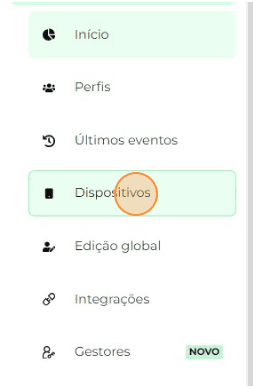
- A list of devices linked to your team will be displayed;
- Click on the lock icon to deactivate the device;
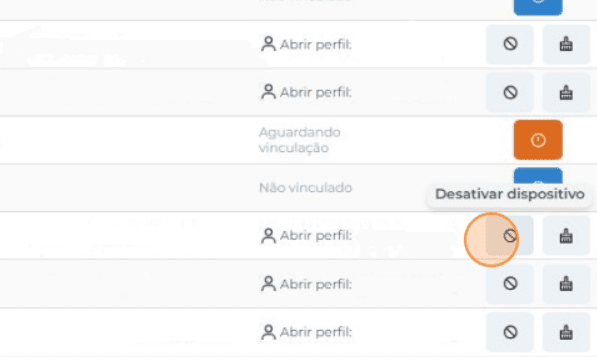
- Next, click on the brush icon to unlink the device and confirm.
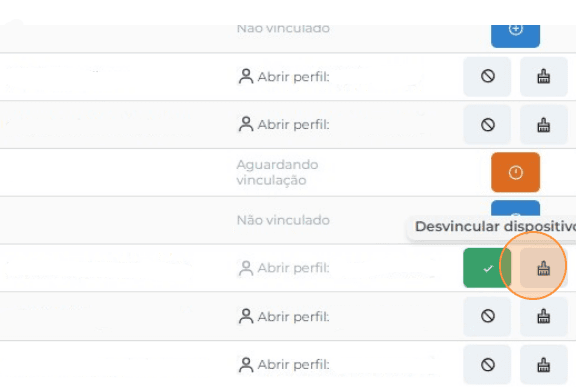

- Done! The device has been successfully reset and is now available to be configured with a new profile.

For this, a new PIN will be generated and the device will need to be activated again.
Attention: When you request the reset, all settings will be cleared, and you will be able to register new data.
Information that may also help you:
How to Link two devices to the same profile
Did this article not help you?
Contact our support team via the website chat, WhatsApp or by email contato@monocard.com.br.