Your online profile makes sharing information quick, easy, and secure.
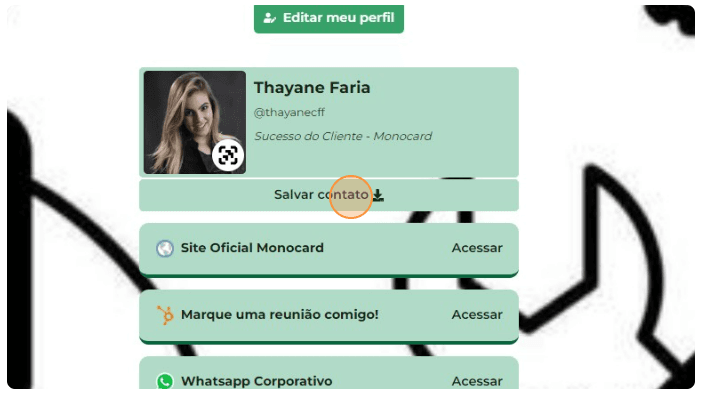
When you share your Monocard, your contacts are directed to a customizable online profile, where they find all the essential information about your business, such as contacts, services, and relevant links.
On this online platform, they will find the direct option to save your data directly to their phone's contacts for future reference.
1- Click on Save contact.
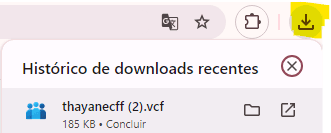
2- The data will be sent to the "Recent Downloads" section.
See how to save your online profile to your phone's contacts:
iPhone
- Scan the Monocard;
- Click the "Save" button on the right side of the profile header;
- Go to the bottom of the page;
- Choose whether to create a new contact, add to an existing contact, or update a contact with the same phone number;
Android
- Scan the Monocard;
- Click the "Save" button on the right side of the profile header to download the .vcard file;
- Open the .vcard;
- If it is not imported and saved automatically, click the “Save” button.
Did this article not help you?
Contact our support team via the website chat, WhatsApp, or by email at contato@monocard.com.br.