Do you already have a Monocard and acquired a Monodot? Or, do you want to have two different cards that direct to the same profile?
It's possible!
See the tutorial below and learn how to link two devices to the same online profile:
-
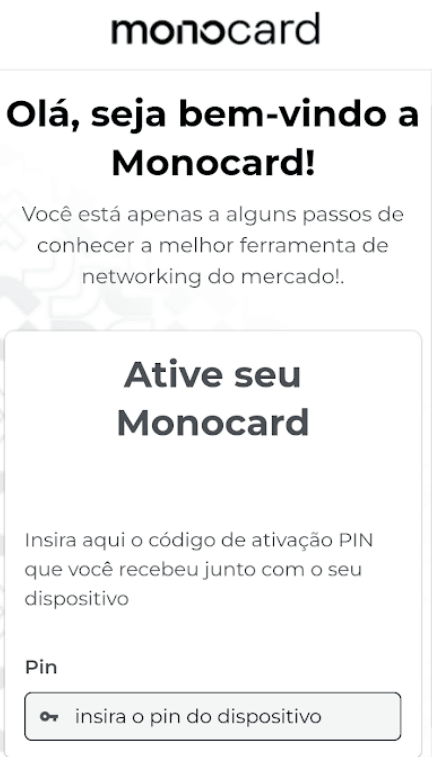
Scan your new device - through the QR code on the cards or by approaching the Monodot;
-
Enter your PIN code and the same email registered on your already activated device
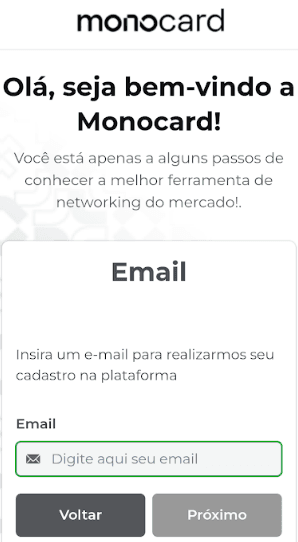
- Select the profile that is associated with the email and that you want to link to this device.
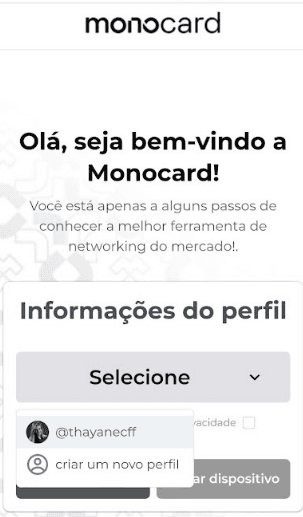
- Click on activate device;
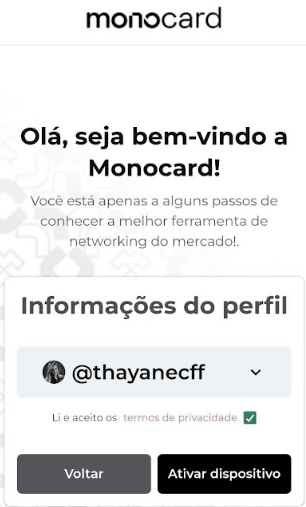
Attention: your PIN is sent by email and also in the packaging along with your device. If you do not have access to the code, contact our support team.
- Upon completing this step, we will send a confirmation code to the email registered on the platform.
Enter this code to complete the verification and linking of your new device to your profile - by clicking Confirm, the process is finished!
Don't forget: the email entered in the linking request must be the same email registered in your Monocard profile!
Information that may also help you
Did this article not help you?
Contact our support team via the website chat, WhatsApp, or by email at contato@monocard.com.br.